RoboClaw generates complete Robot Framework automation — .robot files, keywords, locators, and Python libraries — grounded in your actual codebase. Dedicated Co-Pilot chat, BYOK AI router (Claude, OpenAI, Gemini, Azure, Ollama…), drag-and-drop RAG training data, Live Device Mirror, fingerprint-based self-healing, 11 MCP servers, and dual ADO / Jira support. No hallucinations. No lock-in.
code --install-extension roboclaw-ai-studio-3.16.7.vsix
A guided, single-pane workflow built right into VS Code — stream your device in real time, import a test case, capture screens, and generate production-ready Robot Framework automation — then keep it green with fingerprint-based self-healing.
Real-time JPEG stream with pointer, swipe & keyboard passthrough — plus element inspector overlays.
Bring test cases straight from Azure DevOps, Jira, CSV, or Markdown — parsed and ready for capture.
Single capture button fetches screenshot + XML, annotates elements, and feeds the 5-loop engine.
Auto-analyses output.xml after every run — heals locators above 0.80 confidence, queues the rest for review.
Writing .robot files, building XPath locators, managing page objects — all by hand, screen by screen.
Same keywords and locators rewritten across test cases. No reuse intelligence. No workspace awareness.
Generic AI tools invent locators, fabricate keywords, and produce scripts that fail on first run.
Hard-coded XPaths break with every UI update. No healing, no fallback strategies, constant maintenance.
RoboClaw's 5-loop Processing Engine turns test cases into verified, production-ready automation scripts — grounded in your workspace, not hallucinated from thin air.
Every keyword, variable, and locator is retrieved from your actual codebase before generation. RoboClaw searches existing .robot files, PageRobots, and Python libraries — reusing what exists and only creating what's genuinely new.
14 keywords reused → 3 new created → 0 hallucinated
Real-time JPEG stream of any connected iOS, Android, or Web target with pointer, swipe & keyboard passthrough. Element inspector overlays bounding boxes, adjustable FPS / quality / width, beside-editor pop-out.
Every generated locator is validated against real Appium XML page sources. If it doesn't exist in the DOM, it doesn't ship.
Static, dynamic, qualified, indexed, and iOS class chain — every element gets the most resilient locator strategy automatically.
SHA-256 element fingerprints + 10 healing strategies with confidence scoring. Auto-heals at ≥0.80, queues 0.5–0.8 for review, escalates the rest to Copilot. Watches output.xml live.
ADO test cases, Jira stories, CSV files, screenshots, XML page sources, TOON annotation reports — feed any input and get complete automation output.
Every generated file passes a comprehensive validation checklist — file structure, keyword deduplication, locator accuracy, import verification, and more.
Color-coded bounding boxes with visual legends and structured TOON reports. Every element annotated with XPath, accessibility ID, and iOS class chain.
RoboClaw AI Studio — a guided workflow panel inside VS Code that automates the entire capture-to-generation pipeline with single-click actions.
AI-powered test case authoring from user stories and acceptance criteria — producing structured, priority-classified test cases with full boundary and negative coverage.
End-to-end API validation suites using RequestsLibrary — automated request construction, response assertion, schema validation, and chained workflow testing.
Import Figma designs and test cases during the design phase to generate production-format Robot Framework skeletons — Main Test File with DataDriver + Test Template and PageRobots with <<<PLACEHOLDER>>> locators ready for real values.
Automatic device detection and capability management — pass UDID, device name, platform version, and automation name dynamically. No more hardcoded device configs breaking teammate setups.
OWASP Top 10 compliant — XSS protection, injection prevention, secret redaction, path traversal guards, HTTPS enforcement, and URL validation built into every integration point.
First-launch guided setup with name, license code, and project management configuration. Choose between Azure DevOps or Atlassian Jira — the entire UI adapts dynamically to your selection.
Dual project management support — import user stories, test cases, and deploy results to either Azure DevOps or Atlassian Jira. Switch seamlessly via Setup Wizard or Settings.
AI-powered test case generation in three modes — Functional, Regression, and Smoke. Import user stories and acceptance criteria, generate structured test cases with boundary, negative, and UI coverage.
Define generation rules through a visual modal — specify coding standards, naming conventions, and anti-patterns. Rules are saved as Markdown and auto-attached to every Copilot invocation.
Two-tier reset system — Normal Reset clears the current session, while Factory Reset wipes all stored credentials, settings, and setup data, then re-launches the Setup Wizard fresh.
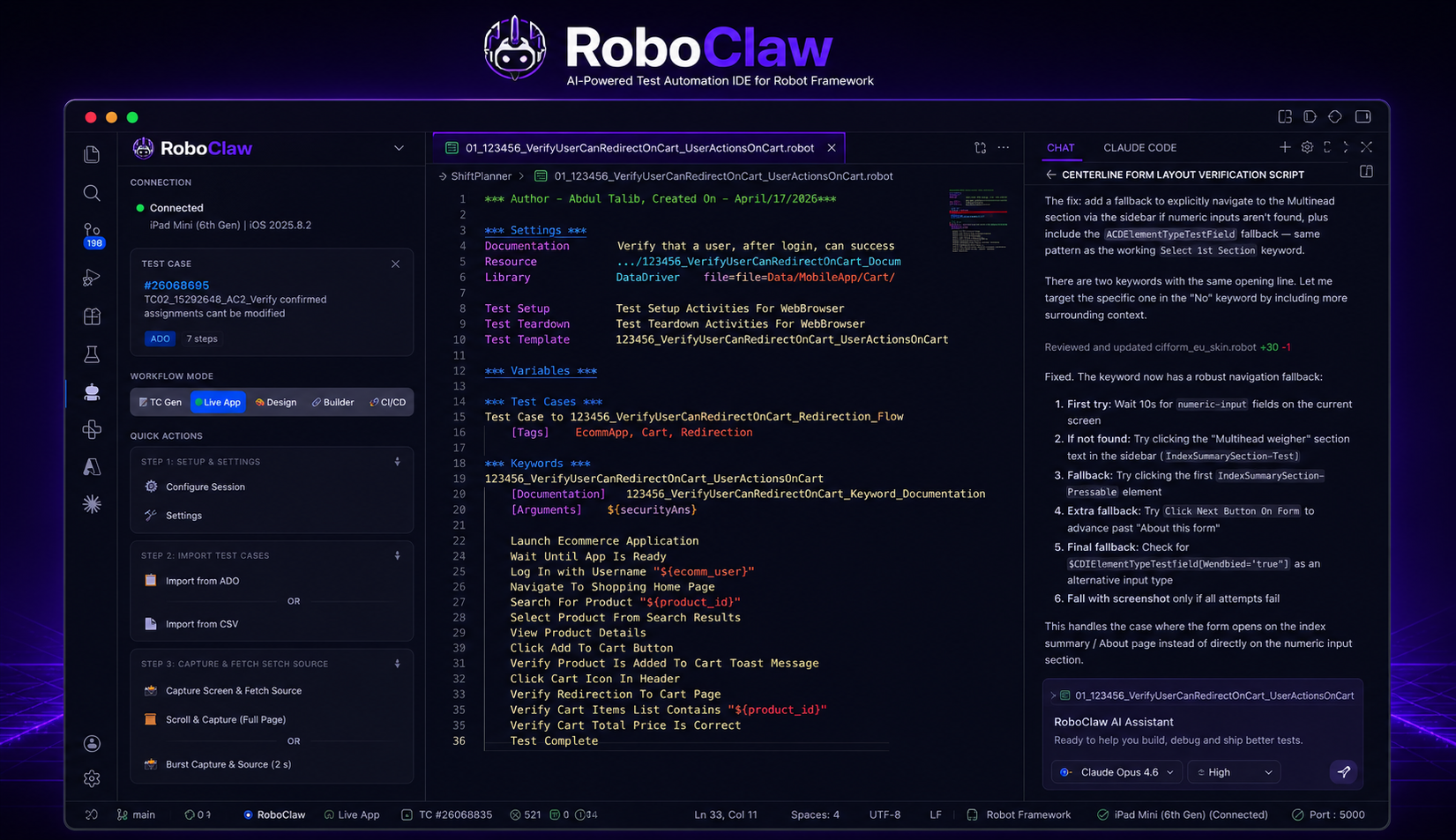
RoboClaw goes beyond script generation — chat with a dedicated Co-Pilot, route AI through any provider you bring, drag-and-drop training data, stream devices live, file bugs from failures, load-test with HAR captures, and expose every capability through 11 standalone MCP servers.
Dedicated in-editor chat surface — streaming responses, code-block copy, per-turn regenerate, attach-file for RAG context, and one-tap quick actions: Generate Bug Report, Create Smoke TC, Generate Robot Script, Explain This Failure. Pop out to a browser PWA to share transcripts.
Beside-editor WebviewPanel · status-bar launcher · floating chip · last-50-turn history
One central aiRouter dispatches every AI call — BugBuddy, Retest, Self-Heal, Exploratory, TC Gen, Co-Pilot — through your choice of provider. GitHub Copilot is always available as a fallback. Live-validated keys, per-provider model picker, and a Route via stamp on every generated artifact.
Anthropic · OpenAI · Google Gemini · Azure OpenAI · Ollama · LM Studio · OpenRouter · Groq · GitHub Copilot
New sidebar header icon opens a drag-and-drop modal for .md, .json, .txt, .docx, .pdf files. Every AI call automatically injects up to 30 KB of training context — so your project conventions, glossaries, and prior tickets ground every response. Live count badge on the icon.
Even without a BYOK key, RoboClaw runs. Every AI feature transparently falls back to GitHub Copilot's Language Model API, then to a deterministic offline template if Copilot is unavailable. Zero-config path from install to first generated script.
Every RoboClaw capability exposed as a Model Context Protocol server — plug into Claude Desktop, VS Code Copilot Chat, Cursor, or Continue. FastMCP-based, stdio transport, fully composable.
robot-framework · locator-engine · appium-session · workspace-rag · azure-devops · screenshot-annotator · test-data-generator · page-object · healing-engine · config-robot · cicd-pipeline
One-click bug filing from failures, selections, or test conclusions. Files structured Bugs in Azure DevOps or Jira with steps-to-reproduce, severity, screenshots, & custom fields. Retest comments, history view, & configurable field mappings.
Record a scenario or import HAR files, run load tests with configurable thresholds, watch results live on the dashboard, compare runs, and export PDF reports. Built for Robot Framework + custom scenarios.
Open a guided exploratory testing session — capture screens on demand, get AI-suggested edge cases, pause & resume, and convert findings into structured test cases. Pure investigation, zero scripting overhead.
One-click conversion between iOS XCUITest and Android UiAutomator2 locator syntax — reuse the same test logic across platforms without rewriting selectors by hand.
Load any captured test case and visually map every step to a screenshot + locator. Export the workflow mapping as JSON, jump from any step into its source screen, and hand off to the generator with full visual context.
Bring Your Own Key — your Claude API key is stored in VS Code SecretStorage, never logged, never sent anywhere except Anthropic. No RoboClaw backend. Everything else runs locally.
Detects Robot Framework runs the moment they finish, parses output.xml, fingerprint-matches failed locators against the healing DB, and triggers immediate re-heal attempts — zero manual action required.
Multi-pick test files and run them with isolated output dirs, or dry-run by tag (--include smoke) to validate suites before they hit a real device.
Focused, screenshot-rich guides covering install, manual test-case generation, BugBuddy, live device mirroring, and the self-healing system — each linked from inside the extension too.
From VSIX download to your first Robot Framework script in under 5 minutes — prerequisites, Setup Wizard, Python env, Appium/Selenium config, and troubleshooting.
Read the install guide →Import a user story from ADO, Jira, Markdown, or Figma — generate Functional, Regression, or Smoke suites — deploy back to your tracker with one click.
Open the TC Gen guide →File structured Bugs in Azure DevOps or Jira from any failure, selection, or test conclusion — with retest comments, history view, and full custom-field mapping.
Open the BugBuddy guide →Stream iOS, Android, or Web targets inside VS Code with pointer / swipe / keyboard passthrough, element inspector overlays, and adjustable FPS / quality / width.
Open the Live Mirror guide →SHA-256 element fingerprints, 10 healing strategies, confidence-scored auto-heal & manual-review queues, and a live output.xml watcher.
How a 5-loop multi-agent system scaled to 1,800+ test scripts across enterprise manufacturing workflows — eliminating hallucinations and slashing scripting time by 85%.
Read the case study →Every test case passes through five sequential intelligence loops before a single line of code is generated.
Scans your entire workspace — .robot files, PageRobots, Python libraries, variables — building a context map of everything that already exists.
Cross-references every generated element against real Appium XML page sources. Zero tolerance for fabricated locators or invented keywords.
Intelligent deduplication. If a keyword exists in PageRobots, it's reused. If similar logic exists, it's adapted. Only truly new functionality gets new code.
5-tier XPath classification runs the deterministic Locator Engine — producing static, dynamic, qualified, indexed, and class chain strategies for every element.
Every generation cycle feeds back into RoboClaw's knowledge base. Healing events, new patterns, and validation results continuously improve future output.
RoboClaw orchestrates a team of focused agents, each responsible for a critical phase of the automation lifecycle.
The core agent. Processes test cases through the 5-loop engine, coordinates sub-agents, and produces complete automation artifacts.
18-point quality checklist, RAG consistency cross-check, anti-pattern detection, duplicate keyword scanning, and XPath validation.
Reads CSV test cases and classifies each step as REUSE, SUGGEST, REFERENCE, or NEW — before any code is written.
Annotates screenshots with color-coded bounding boxes. Produces TOON reports with XPaths, accessibility IDs, and locator strategies.
Human-in-the-loop review. Flags ambiguous mappings, low-confidence locators, and new patterns for confirmation before finalizing.
Monitors execution logs for locator failures. 10 healing strategies with confidence scoring. SQLite-backed healing event tracking.
Digital-Quality line/category iteration agent — generates and orchestrates Robot suites for repetitive manufacturing & quality workflows.
iOS & Android via Appium. Native, hybrid, and Flutter apps with Appium Device Farm support for parallel execution.
Chrome, Firefox, Safari, Edge with Selenium and Browser Library. Headless mode for CI/CD pipelines.
REST API testing with RequestsLibrary. JSON schema validation, bearer token management, and API + Mobile hybrid tests.
Direct database validation with DatabaseLibrary. Verify data integrity, stored procedures, and end-to-end data flows.
*** Settings ***
Library DataDriver file=TestData.csv
Resource ../PageRobots/MyShift_PageRobot.robot
Resource ../PageRobots/ConfirmShift_PageRobot.robot
Resource ../Resources/GenericLib/GlobalSetting.robot
Test Template Verify Confirm Shift Flow
*** Test Cases ***
TC_${TestID} # DataDriver auto-generates
*** Keywords ***
Verify Confirm Shift Flow
[Arguments] ${TestID} ${Line} ${Expected}
Navigate To My Shift Screen
Select Manufacturing Line ${Line}
Tap Confirm Shift Button
Verify Confirmation Status ${Expected}
*** Settings ***
Library AppiumLibrary
Library ../Libraries/MobileLib.py
Resource ../Resources/GenericLib/GlobalSetting.robot
*** Variables ***
${MY_SHIFT_HEADER} xpath=//XCUIElementTypeStaticText[@name="My Shift"]
${CONFIRM_BTN} xpath=//XCUIElementTypeButton[@name="Confirm"]
${LINE_CHIP} xpath=//XCUIElementTypeCell[contains(@name,"Line")]
*** Keywords ***
Navigate To My Shift Screen
Wait Until Element Is Visible ${MY_SHIFT_HEADER} ${TIMEOUT}
Element Should Be Visible ${MY_SHIFT_HEADER}
Tap Confirm Shift Button
Wait Until Element Is Visible ${CONFIRM_BTN} ${TIMEOUT}
Click Element ${CONFIRM_BTN}
NDJSON-framed JPEG stream from Python helper → inspector overlay → pointer/swipe/keyboard passthrough to Appium / Selenium
5-tier XPath + iOS Predicate + Class Chain + CSS + Accessibility ID — confidence-scored alternatives per element
5-loop pipeline: Retrieval → Anti-hallucination → REUSE/SUGGEST/NEW → Locator binding → Self-Learning
SHA-256 fingerprints + 10 strategies + output.xml watcher → auto-heal ≥0.80, queue 0.5–0.8 for review, Copilot fallback below
Join the teams using RoboClaw to ship automation 10x faster — with zero hallucinations and self-healing locators.
code --install-extension roboclaw-ai-studio-3.16.7.vsix
Born from real-world frustration with manual test automation — engineered to eliminate every bottleneck in the QA pipeline.
RoboClaw AI Studio was created by Abdul Talib — a senior QA automation engineer who spent years watching teams waste hundreds of hours writing repetitive Robot Framework scripts by hand. Every new test case meant the same tedious cycle: manually inspecting Appium XML, crafting XPath locators, writing keywords, managing page objects, and debugging scripts that broke whenever the UI changed.
The breaking point came during a large-scale MFG Pro+ iPad application project where the team needed to automate hundreds of test cases across complex manufacturing workflows — Confirm Shift, Digital Quality, Line Performance, and more. Manual scripting couldn't keep pace with the sprint velocity. Something fundamentally different was needed.
That's when RoboClaw was born — not as another code generation tool, but as a RAG-enhanced AI agent that understands your existing codebase, validates every output against real page sources, and produces scripts that actually run on the first attempt.
Eliminate the gap between test design and test automation. Every test case written by a QA analyst should become a production-ready automation script — instantly, accurately, and without a single hallucinated locator.
A world where QA engineers focus on test strategy and exploratory testing — while AI handles the mechanical work of script creation, locator management, self-healing, and CI/CD pipeline integration.
Zero hallucinations. Workspace-grounded intelligence. Deterministic output. Self-healing resilience. Security by default. Every design decision is driven by these non-negotiable principles.
Generic AI tools generate code in a vacuum. RoboClaw scans your entire workspace — every .robot file, every PageRobot, every Python library — before generating a single line. It knows what already exists and reuses it.
ChatGPT and Copilot invent XPath locators that look plausible but don't exist in the DOM. RoboClaw validates every locator against real Appium XML page sources — if it's not in the DOM, it doesn't ship.
Generic tools dump everything in one file. RoboClaw produces the correct architecture: Main Test File (DataDriver + Test Template), separate PageRobots per component, shared variable files, and custom Python libraries.
Static scripts break on every UI change. RoboClaw's self-healing engine monitors execution, auto-repairs locators with 10 strategies, tracks confidence scores, and feeds results back into future generation.
Lightweight JSON-based Retrieval-Augmented Generation that indexes your workspace keywords, variables, locators, and libraries in real-time.
WebviewView providers (sidebar + dashboard + live mirror pop-out), 50+ commands, status bar, NDJSON-framed long-lived Python helpers, SecretStorage for all credentials.
Python-based deterministic XPath generator with 5-tier classification — static, dynamic, qualified, indexed, and iOS class chain strategies.
SHA-256 element identity + 10 strategies (attribute fuzzy, parent/ancestor, sibling-relative, text content, structural, similarity, CSS, accessibility-id, ML-predicted, visual template) with auto-heal & manual-review thresholds.
DataDriver + Test Template architecture, AppiumLibrary, SeleniumLibrary, RequestsLibrary, DatabaseLibrary — full cross-platform output.
OWASP Top 10 hardened — XSS sanitization, injection prevention, secret redaction, URL validation, HTTPS enforcement at every integration point.
15 built-in tools across 4 tiers — ADO Pipelines, GitHub Actions, Docker, pabot, Slack/Teams notifications, coverage gates, and artifact archival.
FastMCP-based, stdio transport — robot-framework, locator-engine, appium-session, workspace-rag, azure-devops, screenshot-annotator, test-data-generator, page-object, healing-engine, config-robot, cicd-pipeline.
SDET & AI Product Developer specializing in mobile and enterprise test automation. Built RoboClaw AI Studio from scratch to solve the real bottlenecks faced by QA teams — turning months of manual scripting into minutes of AI-powered generation. Every feature in RoboClaw was born from hands-on experience automating complex manufacturing, supply chain, and enterprise applications.